OpenDream AI Art: Complete Guide to Creating Stunning AI Images
Artificial intelligence has changed digital art by making it possible to create professional-quality images from simple text prompts. Whether you’re a designer, content creator, marketer, or hobbyist, AI art tools can help you generate unique visuals in seconds.
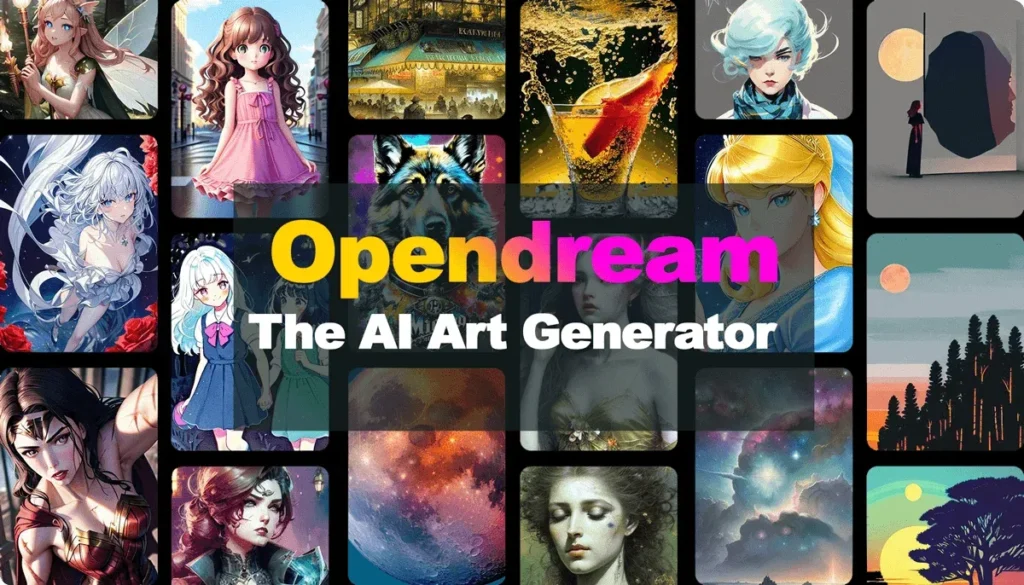
Among the growing number of AI image generators, OpenDream AI Art has become a popular choice because of its browser-based interface, diverse art styles, and ease of use. You don’t need advanced design skills or expensive software to start creating artwork.
This guide explains everything you need to know about OpenDream AI Art, including how it works, its key features, pricing, advantages, limitations, and practical tips for generating better AI images.
Quick Answer
OpenDream AI Art is an AI-powered image generation platform that converts text prompts into digital artwork. Users simply describe what they want to create, choose an art style or model, adjust generation settings, and let the AI produce original images within seconds.
The platform is suitable for beginners and professionals who need illustrations, concept art, fantasy images, anime artwork, marketing graphics, social media visuals, and creative inspiration.
Key Facts
| Feature | Details |
| Platform | Web-based AI image generator |
| Main Function | Text-to-image generation |
| Input | Natural language prompts |
| Output | AI-generated digital artwork |
| Free Plan | Yes (limited usage) |
| Premium Plans | Available |
| Best For | Designers, marketers, creators, students |
| Skill Level | Beginner to Advanced |
What Is OpenDream AI Art?
OpenDream AI Art is an online platform that uses artificial intelligence to transform written descriptions into digital artwork.
Instead of drawing manually, users enter a prompt describing a scene, character, object, or concept. The AI analyzes the prompt and generates one or more original images based on the selected model and settings.
For example, a prompt like:
“A futuristic cyberpunk city at sunset with flying cars and neon lights, ultra realistic.”
can generate detailed artwork within moments.
Because everything runs in a web browser, there is no need to install complex software or own powerful hardware.
How Does OpenDream AI Art Work?
The platform follows a simple workflow.
Step 1: Enter a Prompt
Describe the image you want in natural language.
Example:
“A magical forest with glowing mushrooms, cinematic lighting, fantasy style.”
The more specific your prompt, the more accurate the generated image is likely to be.
Step 2: Select an AI Model
OpenDream provides different AI models that produce various artistic styles.
Depending on the selected model, the output may look:
- Realistic
- Digital painting
- Anime
- Fantasy
- Oil painting
- Watercolor
- Concept art
- 3D illustration
Different models excel at different creative tasks.
Step 3: Adjust Settings
Users can customize image generation by modifying settings such as:
- Image resolution
- Aspect ratio
- Number of images
- Sampling steps
- Prompt strength
- Guidance scale
- Negative prompts
These controls help improve the final output.
Step 4: Generate the Image
Once the prompt and settings are ready, OpenDream processes the request and generates AI artwork in a short time.
Users can download, regenerate, or refine the results.
Main Features of OpenDream AI Art
OpenDream includes several features that make AI image generation accessible and flexible.
1. Text-to-Image Generation
Convert simple text descriptions into original digital artwork without manual drawing.
2. Multiple Art Styles
Generate images in styles such as:
- Photorealistic
- Anime
- Fantasy
- Science Fiction
- Digital Painting
- Pixel Art
- Oil Painting
- Watercolor
- Cartoon
- Illustration
3. High-Resolution Images
Premium plans allow users to create higher-resolution images suitable for:
- Marketing campaigns
- Website graphics
- Blog posts
- Posters
- Presentations
- Print projects
4. Negative Prompts
Negative prompts help remove unwanted elements from generated images.
Example:
Prompt
“A realistic lion in the jungle.”
Negative Prompt
“Blur, watermark, extra legs, text, low quality.”
This often produces cleaner and more accurate results.
5. AI Models
Different AI models provide unique visual styles and performance characteristics.
Users can experiment to find the model that best matches their creative goals.
6. Browser-Based Platform
Since OpenDream runs entirely online, users can access it from most modern browsers without installing desktop software.
Who Should Use OpenDream AI Art?
OpenDream serves a wide range of users.
Content Creators
Generate featured images, YouTube thumbnails, and social media graphics.
Bloggers
Create custom illustrations instead of relying on stock photos.
Graphic Designers
Produce concept art and creative inspiration quickly.
Marketing Teams
Design promotional visuals for advertisements and campaigns.
Game Developers
Create environments, characters, and concept artwork.
Students
Use AI-generated images for presentations and creative assignments.
Authors
Generate book cover ideas and scene illustrations.
Benefits of Using OpenDream AI Art
OpenDream offers several advantages.
Easy to Learn
No graphic design experience is required.
Fast Image Creation
Generate artwork in seconds rather than spending hours designing manually.
Wide Style Selection
Experiment with multiple artistic styles using the same prompt.
Cloud-Based
No expensive graphics card or software installation is necessary.
Creative Inspiration
Generate multiple concepts before beginning a final design project.
Common Use Cases
People use OpenDream AI Art for many creative tasks.
- Blog featured images
- Website illustrations
- Social media graphics
- Digital marketing
- Book covers
- NFT concepts
- Character design
- Game assets
- Storyboarding
- Product mockups
- Wallpaper creation
- Fantasy artwork
OpenDream AI Art Pricing
OpenDream AI Art offers both free and paid plans, making it accessible to beginners as well as professional creators.
| Plan | Best For | Features |
| Free | Beginners | Limited image generations, standard features |
| Paid | Regular users | More credits, higher resolution, faster generation |
| Premium | Professionals | Increased usage limits, priority processing, advanced tools |
Note: Pricing and plan features may change over time. Check the official OpenDream website for the latest information.
OpenDream AI Art Pros and Cons
Pros
- Beginner-friendly interface
- No software installation required
- Supports multiple AI art styles
- Fast image generation
- Works on most modern web browsers
- Free plan available
- High-quality outputs with detailed prompts
- Suitable for both personal and commercial projects (subject to the platform’s licensing terms)
Cons
- Free plan has usage limits
- Complex prompts may require multiple attempts
- Premium features require a subscription
- Image quality depends heavily on prompt quality
- AI may occasionally generate visual inconsistencies
Tips for Creating Better AI Art
The quality of AI-generated images depends largely on the prompt you provide.
Be Specific
Instead of writing:
“A cat”
Try:
“A fluffy white Persian cat sitting beside a fireplace during winter, cinematic lighting, ultra realistic.”
Mention the Art Style
Examples include:
- Digital painting
- Anime
- Oil painting
- Watercolor
- Photorealistic
- Cyberpunk
- Fantasy
- Pixel art
- Concept art
Add Lighting Details
Examples:
- Golden hour
- Studio lighting
- Cinematic lighting
- Soft lighting
- Neon lighting
- Dramatic shadows
Include Camera Terms
For realistic images, add details such as:
- Close-up
- Wide-angle shot
- 85mm lens
- Depth of field
- Bokeh
- Ultra HD
- 8K
Use Negative Prompts
Negative prompts help remove unwanted elements.
Example:
blurry, watermark, extra fingers, distorted face, low quality, text, logo
Common Mistakes to Avoid
Many beginners make simple mistakes that affect image quality.
- Writing prompts that are too short
- Forgetting to specify the art style
- Ignoring lighting details
- Not using negative prompts
- Expecting perfect results on the first attempt
- Using too many unrelated keywords in one prompt
Improving prompts through experimentation often leads to much better results.
OpenDream AI Art vs Other AI Image Generators
| Feature | OpenDream AI Art | Midjourney | DALL·E | Stable Diffusion |
| Browser Based | ✅ | ✅ | ✅ | Depends on platform |
| Free Plan | ✅ | Limited | Limited | Many options available |
| Beginner Friendly | ⭐⭐⭐⭐⭐ | ⭐⭐⭐ | ⭐⭐⭐⭐ | ⭐⭐⭐ |
| Customization | High | Medium | Medium | Very High |
| Installation Required | No | No | No | Sometimes |
| Best For | General AI artwork | Artistic visuals | Everyday image creation | Advanced customization |
Each platform has strengths. OpenDream is a strong choice for users who want an easy-to-use, browser-based AI art generator without a steep learning curve.
Is OpenDream AI Art Worth Using?
If you’re looking for a simple and accessible AI image generator, OpenDream AI Art is worth considering.
It offers an intuitive interface, supports a variety of artistic styles, and allows users to create images without needing advanced hardware or design experience. While the free plan has limitations, it provides a practical way to explore AI-generated artwork before upgrading.
For creators who need quick visuals for blogs, social media, presentations, or creative projects, OpenDream can be a valuable addition to their toolkit.
Key Takeaways
- OpenDream AI Art transforms text prompts into digital artwork.
- It supports multiple art styles, including realistic, anime, fantasy, and digital painting.
- A free plan is available for beginners.
- Better prompts generally produce higher-quality images.
- Browser-based access makes it easy to use without installing software.
- It is suitable for designers, marketers, students, bloggers, and hobbyists.
Conclusion
OpenDream AI Art makes AI-powered image creation accessible to users with a wide range of experience levels. By combining a simple interface with customizable generation settings and diverse artistic styles, it enables creators to produce unique visuals quickly and efficiently.
Whether you’re designing illustrations for a blog, creating marketing graphics, developing concept art, or experimenting with creative ideas, OpenDream provides a flexible starting point. As with any AI image generator, the best results come from well-crafted prompts, thoughtful refinement, and an understanding of the platform’s capabilities.
Frequently Asked Questions
Is OpenDream AI Art free?
Yes. OpenDream offers a free plan with limited image generations. Paid plans provide additional credits, higher-quality outputs, and extra features.
Can I use OpenDream AI Art commercially?
Commercial use depends on the platform’s current licensing terms and your subscription plan. Always review the latest terms before using AI-generated images for business purposes.
Do I need design experience?
No. OpenDream is designed for users of all skill levels, including beginners.
Can I create realistic images?
Yes. With detailed prompts and the appropriate AI model, OpenDream can generate highly realistic images.
Does OpenDream work on mobile devices?
Yes. Since it is browser-based, it can generally be accessed from smartphones, tablets, and desktop computers.
What types of images can I create?
You can generate fantasy scenes, realistic portraits, anime artwork, landscapes, concept art, product mockups, social media graphics, and much more.