
Introduction
Most people hear “AI Studio” and assume it is either a mobile app they need to download or a paid design tool locked behind a subscription. Neither is true. AI Studio is Google’s free, browser based workspace for testing and building with its Gemini AI models, and the confusion around downloads and apps is exactly why so many people search for it without finding a straight answer.
This guide clears that up in the first few lines, then goes further than most write ups by covering the parts nobody else fully answers: what actually happens to your data on the free tier, what goes wrong when you first try Build mode, and when it is time to graduate from AI Studio to a production setup like Vertex AI.
Quick Answer
AI Studio (officially Google AI Studio) is a free, browser based platform where you sign in with a Google account and immediately start testing prompts, generating images, audio, and video, and building small AI powered app prototypes using Google’s Gemini models. There is nothing to download and no separate mobile app; it runs entirely at aistudio.google.com.
Key Insights
- It is not a downloadable program or a phone app. It runs in your browser only.
- The free tier gives you real access to Gemini models, not a crippled demo version.
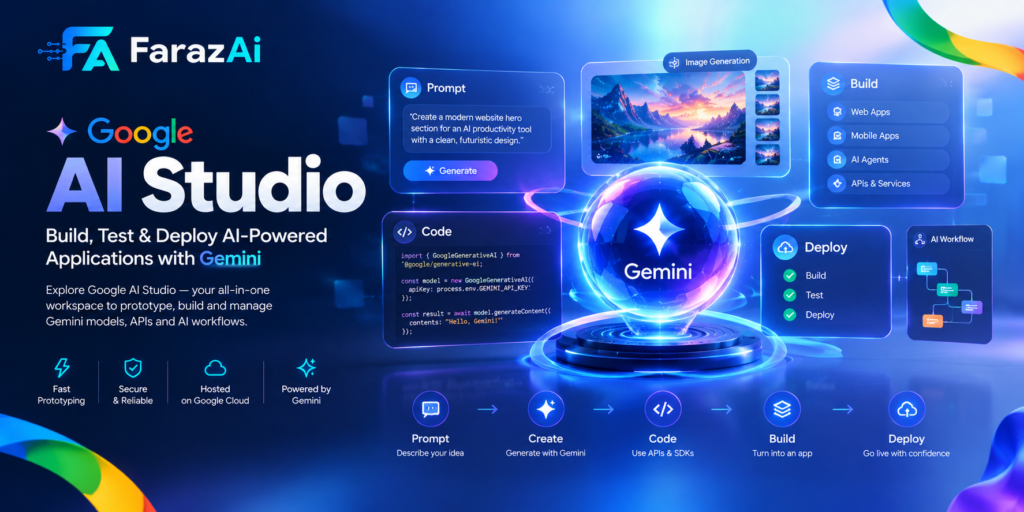
- Three core modes cover almost everything: Chat mode for testing prompts, Build mode for turning prompts into working apps, and Stream mode for live voice and video interaction.
- Prompts you send on the free tier can be used to improve Google’s products unless you actively avoid it, which is a detail most beginner guides skip entirely.
- AI Studio is a prototyping layer. Serious production workloads eventually move to Vertex AI or the Gemini API directly.
What Is AI Studio, in Plain Terms
Picture a blank text box connected directly to one of the most capable AI model families available today, with no setup, no billing screen forced on you, and no code required to get a first result. That is the entire idea behind AI Studio. Google built it as the place where developers, students, marketers, and curious first timers can poke at Gemini models before deciding whether to wire them into a real product.
You sign in with any Google account, land on a dashboard, and start typing. Behind the scenes, every response is powered by Gemini, Google’s family of models built for reasoning, coding, and multimodal understanding, meaning it can work with text, images, audio, and video in the same conversation.
Why the “Download” and “App” Confusion Happens
A meaningful share of people searching for this tool add words like “download” or “app” to their query. That confusion is understandable. Most AI tools people are used to, from Photoshop to ChatGPT’s mobile client, do involve installing something. AI Studio breaks that pattern on purpose. It is a website, full stop. There is no AI Studio download, no installer, and no dedicated app in the App Store or Play Store. If a result claims otherwise, treat it as unofficial and unrelated to Google’s actual product.
Getting Started: The Real First Steps
Getting in takes less time than reading this paragraph.
- Go to the official site and sign in with your existing Google account. No separate registration exists.
- You land on the dashboard, which surfaces chat, build, and documentation options without burying anything in menus.
- Type a prompt and get a response immediately. There is no onboarding tunnel to click through first.
If you plan to eventually connect Gemini to your own application, you will also want an API key. That is a separate, optional step available from the sidebar, and it is only necessary once you move past experimenting inside the browser.
Understanding the Interface
The interface can look dense on first load, but almost everything maps to a small set of ideas.
System instructions let you set ground rules once for an entire session instead of repeating them in every message, for example telling the model to always answer in bullet points or adopt a specific role.
Temperature controls how safe or how creative responses are. Lower values produce consistent, predictable answers, which suits factual or technical tasks. Higher values push toward more varied, imaginative output, which suits brainstorming or creative writing.
Model selector lets you swap between text, image, audio, and video capable models without starting a new session from scratch.
Compare mode runs the same prompt against two models or settings side by side, which is genuinely useful for deciding which configuration actually performs better rather than guessing.
Get code takes whatever you just tested in the browser and turns it into a working code snippet you can drop into a real application, closing the gap between experimenting and shipping.
The Three Core Modes
Chat Mode
This is the default, plain conversation experience. You type, the model answers, and you can attach images, documents, or audio to the same thread. Most people spend the bulk of their early time here simply learning how phrasing changes output quality.
Build Mode (Vibe Coding)
Build mode takes a plain language description and generates a working application around it, commonly referred to informally as vibe coding. You describe what you want in a sentence or two, and the underlying agent writes the actual code, assembles the interface, and gives you a live preview you can click through immediately.
This is where AI Studio stops feeling like a chatbot and starts feeling like a lightweight development environment. You can describe bugs in plain English rather than fixing code yourself, and the model will diagnose the issue and propose a specific correction. Finished projects can be exported as files, pushed to a code repository, or deployed to cloud hosting.
Stream Mode
Stream mode adds real time voice and video. You talk into your microphone, optionally share your screen or webcam, and get spoken responses back without typing anything. It suits live tutoring style sessions, walking through a math problem out loud, or getting real time feedback while debugging on screen. For most text heavy work, Chat mode remains the more practical choice.
AI Studio vs. the Standalone Gemini App
This is a distinction that trips up a lot of newcomers, since both products run on the same underlying models. The Gemini app is the consumer facing chatbot, built for everyday questions, quick writing help, and casual conversation, similar in spirit to how most people use ChatGPT. AI Studio is built for a different job entirely: testing how a model behaves under specific settings, comparing outputs side by side, and turning a working prompt into something you can actually export and reuse.
Put simply, if you want a quick answer to a question, the Gemini app is the faster path. If you want to understand why a model is answering the way it is, tune settings like temperature and system instructions, or eventually wire a prompt into your own application, AI Studio is the right tool. Many people never need AI Studio at all, and that is fine. It exists specifically for the segment of users who want to go one layer deeper than a plain chat window allows.
Real World Use Cases
Content creators use it to draft, repurpose, and translate long form writing, including keeping formatting intact across thousands of words.
Designers generate concept art, social graphics, and mockups using the built in image models without opening a separate design tool.
Developers prototype small applications, compare model outputs side by side, and export working code once a version is ready to integrate.
Researchers and analysts upload PDFs, spreadsheets, and images in a single prompt and ask for a combined summary rather than processing each file separately.
Students and educators use it as a low stakes environment to learn how prompting actually works, since mistakes cost nothing and every response can be immediately rerun.
Example Prompts Worth Testing
A few starting points make the learning curve shorter:
- “Act as a senior developer and review this code for bugs and readability issues.”
- “Summarize this document into five key takeaways a beginner could understand.”
- “Analyze this image and describe what is happening, including anything unusual.”
- “Write three different tone variations of this paragraph: formal, casual, and persuasive.”
Small wording changes tend to shift output quality more than people expect, so testing variations is worth the extra minute.
Expert Analysis: Where It Actually Fits
AI Studio occupies a specific, narrow lane rather than trying to be everything. It is not a finished consumer chatbot like the standalone Gemini app, and it is not a full enterprise deployment platform like Vertex AI. It sits between the two, as the place where an idea gets tested cheaply before anyone commits engineering time to it.
That positioning explains both its biggest strength and its biggest limitation. The strength is speed: an idea can go from a sentence to a working prototype in minutes, with essentially no setup cost. The limitation is durability: sessions do not carry long term memory, and the free tier is not built for production reliability or scale.
Pros and Cons
Pros
- Genuinely free to start, with real model access rather than a stripped down trial
- No installation or setup required
- Covers text, image, audio, and video in one workspace
- Build mode meaningfully lowers the barrier to creating a working app
- Fast iteration loop between testing and exporting code
Cons
- No persistent memory between sessions for ongoing projects
- Free tier usage limits can interrupt heavier workloads
- Advanced settings like temperature and token limits can overwhelm complete beginners at first
- Not intended for production scale traffic or guaranteed uptime
- Model availability and naming shift often, which can make tutorials go stale quickly
AI Studio vs. Other AI Platforms
| Platform | Free Tier | Best For | Notable Limitation |
| AI Studio | Yes, generous, browser only | Prototyping, multimodal testing, vibe coding | No long term memory, prototype focused |
| ChatGPT | Limited daily messages | General conversation, writing, brainstorming | Less native app building |
| Claude | Limited daily messages | Long document reasoning, coding assistance | Smaller multimodal generation set |
| Vertex AI | Pay as you go, no free chat tier | Production deployment, enterprise scale | Steeper setup, not for casual testing |
The honest way to read this table: if you are deciding whether an idea is worth building at all, AI Studio is the cheapest way to find out. If you already know the answer is yes and need reliability at scale, that is a Vertex AI conversation, not an AI Studio one.
Data and Privacy: The Question Most Guides Skip
A fair number of people ask, directly or indirectly, what happens to what they type. On the free tier, prompts and responses can be used by Google to improve its products unless you take steps to limit that, such as using a temporary or unsaved session where available. This is materially different from a paid API arrangement, where usage terms are typically more restrictive about training use. Anyone testing sensitive, proprietary, or client work should treat the free tier accordingly and check the current terms directly on Google’s site before uploading anything confidential.
Troubleshooting Common Problems
This is the section most competing guides skip entirely, even though it is often where beginners get stuck first.
A Build mode app breaks mid preview. This usually happens when the described feature involves something the underlying model has to guess at, like a specific calculation or rendering behavior. Describe the exact error you see in plain language, including what you expected versus what happened. The agent can typically diagnose the issue and propose a specific fix rather than requiring you to read the generated code yourself.
Responses feel repetitive or generic. This is almost always a system instructions problem, not a model limitation. Vague instructions produce vague output. Being specific about tone, format, and constraints usually fixes this within one or two attempts.
You hit a usage limit unexpectedly. Free tier limits are tied to compute usage rather than a simple message count, so a handful of complex requests can use up more allowance than dozens of simple ones. If you are testing heavier workloads regularly, this is a signal you may be approaching the point where a paid tier or API based setup makes more sense.
A model you used last week is no longer listed. Google updates and retires model versions more frequently than most tools in this space. If a specific model disappears, check the model selector for its direct successor rather than assuming the feature itself was removed.
Common Mistakes to Avoid
- Assuming there is an app to download, then giving up when no listing appears in an app store
- Writing vague prompts and blaming the model instead of refining the instruction
- Uploading confidential documents on the free tier without checking current data use terms
- Treating Build mode output as production ready code without review
- Ignoring system instructions entirely and repeating the same context in every single message
Best Practices
- Set system instructions once at the start of a session instead of repeating context
- Start with a lower temperature for factual tasks and raise it only for creative work
- Use compare mode before assuming one model or setting is better than another
- Export and review generated code carefully before deploying anything built in Build mode
- Revisit model names periodically, since Google updates and retires versions more often than most tools
Key Takeaways
- AI Studio is a website, not a download or a mobile app
- It is genuinely free to start, with real access to Gemini models
- Chat, Build, and Stream modes cover testing, app creation, and live interaction respectively
- It is built for prototyping, not for replacing a production deployment setup
- Data handling on the free tier deserves a second look before uploading anything sensitive
Conclusion
AI Studio earns its growing search volume honestly. It solves a real problem: testing an AI idea used to require setup, cost, or both, and now it requires neither. The parts worth remembering are simple. It is a browser tool, not a download. It is free enough to actually be useful, not just a trial. And it is meant for prototyping, so treat anything you build there as a first draft rather than a finished product until you have reviewed it properly. Used with that mindset, it is one of the fastest ways to turn a vague AI idea into something you can actually see working.
FAQs
Is AI Studio free to use? Yes. You need only a Google account, and most core features are available without payment. Usage limits apply on heavier workloads.
Can I download AI Studio as an app? No. AI Studio runs entirely in a web browser at aistudio.google.com. There is no installer and no official mobile app.
Do I need coding skills to use it? No. Chat mode and Build mode both work with plain language instructions. Coding knowledge helps once you want to review or extend exported code, but it is not required to get started.
What is Build mode used for? Build mode turns a written description into a working application prototype, including a visual interface, with the option to export the code or deploy it once you are satisfied with the result.
Is my data safe on the free tier? Free tier prompts can be used to improve Google’s products unless you take steps to limit that. Sensitive or confidential material should be treated carefully, and current terms should be checked directly before uploading anything private.