Introduction
Search “Google Veo 3” and you’ll land in the middle of a pricing maze. One article says it’s free. Another quotes $249 a month. A third throws API rates at you in dollars per second. None of them agree, and most of them are outdated, because Google restructured its AI subscription tiers in 2026 and a lot of guides never caught up.
This article cuts through that. You’ll get the real, current answer to whether Veo 3 is free, exactly what each paid tier costs, how availability works if you’re outside the US, and a step-by-step path to generating your first video today.
Quick Answer
Google Veo 3 is not fully free, but it isn’t locked behind a paywall either. Google gives everyone a limited free allowance through the Gemini app and Flow, Google’s AI filmmaking tool, refreshed periodically. For unlimited or near-unlimited use, you need a paid Google AI plan: AI Plus at roughly $4.99/month, AI Pro at $19.99/month, or AI Ultra at $99.99 to $199.99/month, depending on the tier. Developers who want programmatic access pay per second through the Gemini API instead of a flat subscription.
What Is Google Veo 3?
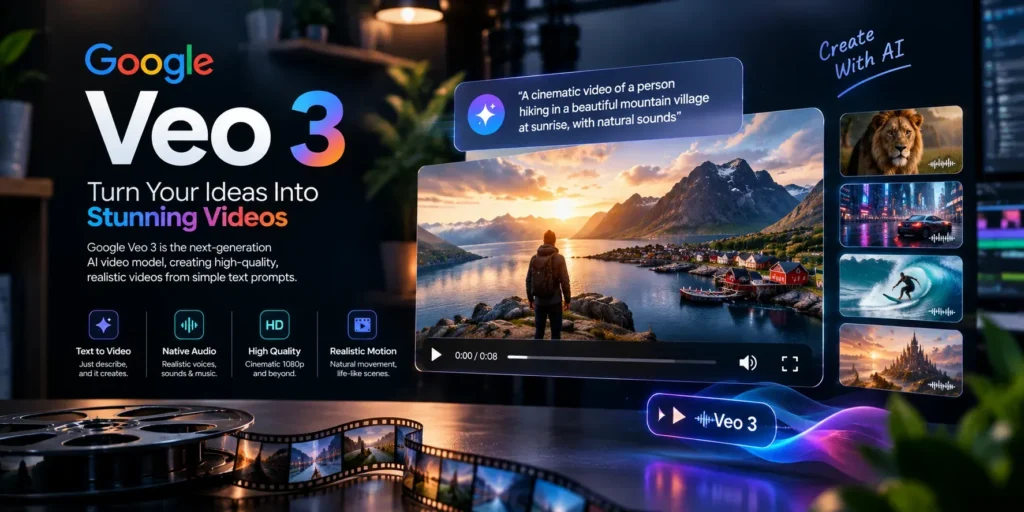
Veo 3 is Google DeepMind’s text-to-video and image-to-video AI model. You describe a scene in plain language, or upload a photo, and it generates a short video clip, typically capped at eight seconds. What separates Veo 3 from most competitors is native audio: it doesn’t just generate silent footage you have to dub later. It produces ambient sound, sound effects, and even synced dialogue directly with the visuals, matching lip movement and timing automatically.
The model launched at Google I/O 2025 and has since moved to Veo 3.1, which added 4K output, start-and-end frame control for smoother transitions, an “Ingredients” feature that blends up to three reference images into one scene, and an “Extend” tool that stretches existing clips by a few more seconds without regenerating from scratch.
Is Veo 3 Free?
Partially. Google offers a free tier through the Gemini app and Flow, but it’s intentionally limited to keep compute costs manageable, and the exact allowance shifts over time and by region. Free users typically get a small daily or monthly credit pool, enough to test the tool and generate a handful of short clips, not enough for regular content production.
If your goal is casual experimentation, the free tier works. If you want reliable, repeated access without watching a credit counter, you’ll need a paid plan.
Google Veo 3 Pricing: The Full Breakdown
Google restructured its consumer AI pricing at I/O 2026, which is why older articles quoting a flat $249.99/month for the top tier are no longer accurate. Here’s the current structure.
| Plan | Monthly Price | What You Get for Video |
| Free | $0 | Limited Veo access via Gemini app and Flow; credits refresh periodically |
| Google AI Plus | ~$4.99 | Entry-level video generation, smaller Flow credit allowance |
| Google AI Pro | $19.99 | Full Veo 3.1 access, around 1,000 Flow credits/month, expanded Gemini limits |
| Google AI Ultra (5x) | $99.99 | Roughly 5x Pro’s usage limits, larger Flow credit pool, priority access to new features |
| Google AI Ultra (20x) | $199.99 | Roughly 20x Pro’s usage limits, the largest Flow allowance, first access to experimental tools like Deep Think |
For developers, Google also sells Veo through the Gemini API on a per-second basis rather than a subscription. Rates vary by model tier: Veo 3.1 Lite is the cheapest option, Fast sits in the middle for quick drafts, and Standard (or “Quality”) costs the most, with 4K output carrying an additional premium. This route makes sense if you’re building an app or automated pipeline around video generation, since you pay only for what you generate instead of a flat monthly fee.
One practical note: unused Flow credits generally don’t roll over to the next billing cycle, so a subscription’s real value depends on whether you’ll actually use your monthly allowance.
How to Get Google Veo 3
You have three main paths, depending on how much control and volume you need.
- Through the Gemini app (easiest). Open Gemini on web or mobile, select the video or image-to-video tool, describe your scene, and generate. This is the fastest way to try Veo 3 without any setup.
- Through Flow (best for creative control). Flow is Google’s dedicated AI filmmaking interface. It supports start-and-end frame control, the Ingredients feature for blending reference images, and Extend for lengthening clips. It’s better suited to anyone treating this as an actual creative tool rather than a quick experiment.
- Through the Gemini API or Vertex AI (best for developers). If you’re integrating video generation into a product, workflow, or automation, the API gives you programmatic access billed per second of output.
Is Veo 3 Available in Pakistan?
Yes. Google expanded Veo 3 and Flow to Pakistan alongside more than 150 countries, giving local creators, marketers, and filmmakers access to the same tools available in the US and Europe. AI Pro is generally the entry point for full Veo access in the region, with AI Ultra available for higher-volume use. Local pricing is billed in PKR at the equivalent of the USD tiers above, so expect it to move with exchange rates rather than staying fixed.
If you’re outside the US specifically for AI Ultra, double-check availability before subscribing, since some of the newest features tied to Ultra (like certain agentic tools) have rolled out US-first before expanding elsewhere.
Veo 3 vs. Sora vs. Runway: Where It Stands
You don’t need a full comparison article to make a decision here, just the core trade-offs:
- Veo 3’s edge: native, synced audio generation is still one of its strongest differentiators. Most competing models generate silent video that needs separate audio work.
- Realism and physics: Veo 3 handles lighting, fluid motion, and object interaction convincingly, which matters for anything meant to look grounded rather than obviously synthetic.
- Ecosystem lock-in: if you’re already using Gemini, Google Workspace, or Google Cloud, Veo 3 slots in without extra integration work. If you’re not in that ecosystem, that advantage disappears.
- The trade-off: clip length is still short (around eight seconds per generation), so longer-form content means stitching multiple clips together, either manually or through Flow’s Extend feature.
Common Mistakes People Make With Veo 3
Assuming “free” means unlimited. The free tier is a trial-sized allowance, not a permanent free plan for regular use.
Subscribing to Ultra without checking regional feature availability. Some Ultra-exclusive tools launch in the US first. Confirm what’s actually live in your country before paying for the top tier.
Ignoring the audio prompt. Veo 3’s native audio is prompt-driven. If you don’t describe the sound you want, ambient noise, dialogue, music, you’ll often get a flatter result than the model is capable of.
Not budgeting for retries. Whether you’re on a subscription or the API, generations don’t always match your intent on the first try. Factor in a few retries per final clip, especially on API billing where retries cost real money.
Confusing Veo 3 and Veo 3.1 pricing. The two have different capabilities and, in some cases, different rates. If you’re comparing prices across articles, check which version they’re actually quoting.
Best Practices for Better Results
Write prompts the way you’d direct a scene, not just describe a subject. Mentioning camera movement (“slow dolly zoom,” “over-the-shoulder shot”), lighting conditions, and mood gives the model more to work with than a bare description.
Use image-to-video when you have a specific starting point in mind, a product photo, a portrait, a location shot, rather than relying purely on text, especially for anything where visual consistency matters.
Start on the cheaper or free tier to learn how the model responds to your prompting style before committing to a higher subscription tier or heavier API usage.
Key Takeaways
- Veo 3 has a limited free tier through Gemini and Flow, but real production use needs a paid plan.
- Google’s 2026 pricing restructure lowered Ultra from $249.99 to $99.99–$199.99/month and added a cheaper $4.99 AI Plus tier.
- Pakistan and 150+ other countries have official access, with AI Pro as the practical entry point for full Veo 3 use.
- Native, synced audio is Veo 3’s biggest differentiator against Sora and Runway.
- Clips are capped around eight seconds; longer content requires stitching or the Extend feature.
Conclusion
The honest answer to “is Google Veo 3 free” is: free enough to try, not free enough to rely on. Google’s 2026 pricing shift actually made paid access more affordable than it used to be, especially with Ultra’s price cut and the new entry-level Plus tier. If you’re just curious, start with the free allowance in Gemini or Flow. If you’re producing content regularly, AI Pro is the realistic starting point, with Ultra reserved for genuinely high-volume creative or agentic workflows. Whichever tier you land on, the model itself, particularly its native audio generation, remains one of the more distinctive tools in AI video right now.
FAQs
Is Google Veo 3 free? There’s a limited free tier through the Gemini app and Flow, but it’s capped and meant for light use. Full access requires a paid Google AI plan.
Is Veo 3 AI video free unlimited? No. No current plan, free or paid, offers unlimited generation. Every tier, including the top Ultra plan, works on a credit allowance.
How do I get Veo 3 on Google? Open the Gemini app or Flow, select the video generation tool, and either write a text prompt or upload an image. A paid AI Pro or AI Ultra subscription unlocks full access and higher limits.
What is the price of Veo 3 in Pakistan? Veo 3 is officially available in Pakistan through Google AI Pro (around $19.99/month equivalent in PKR) and AI Ultra (from about $99.99/month equivalent), following Google’s regional rollout.
What’s the difference between Veo 3 and Veo 3.1? Veo 3.1 builds on Veo 3 with 4K resolution, start/end frame control, the Ingredients feature for combining reference images, and the Extend tool for lengthening clips.
Can developers access Veo 3 without a subscription? Yes, through the Gemini API or Vertex AI, billed per second of generated video rather than a flat monthly fee.