
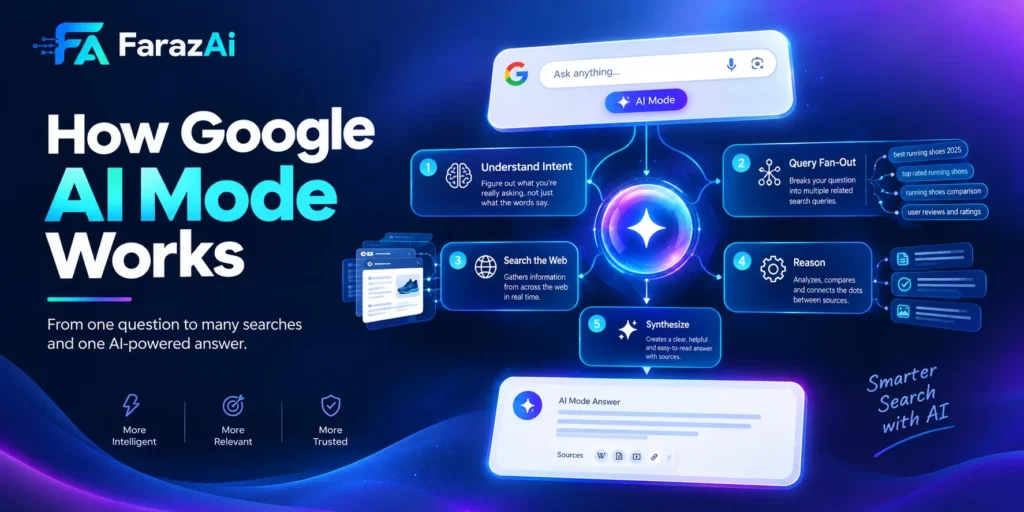
How Google AI Mode Works?
Google Search used to feel simple: type a few words, scroll a list of blue links, click one, repeat. AI Mode breaks that pattern entirely. Instead of matching keywords to pages, it reads your question the way a researcher would, runs dozens of searches behind the scenes, and hands you a single synthesized answer with sources attached.
If you have ever wondered what actually happens between the moment you type a question and the moment AI Mode answers it, this guide walks through the full mechanism, in plain language, with no filler.
Quick Answer: What Is Google AI Mode?
Google AI Mode is a conversational search experience, powered by Google’s Gemini models, that interprets your query, generates multiple related sub-searches automatically (a process called query fan-out), retrieves and analyzes content across those sub-searches, and produces one synthesized, cited answer instead of a list of links. It lives in its own tab or mode, separate from traditional search and from the shorter AI Overviews summaries.
Why Google Built AI Mode in the First Place
Traditional search was built to match strings, not meaning. It works well for short, factual lookups, but it struggles with layered questions like “compare these two neighborhoods for a family with young kids and a tight budget.” Answering that properly means pulling in school data, housing costs, crime statistics, and commute times, then weighing them together.
Search behavior has shifted too. People now type entire sentences instead of two or three keywords, and they expect an assistant, not a directory. AI Mode is Google’s answer to that shift, and it grew directly out of the underlying technology already powering the shorter AI Overviews summaries that sit above regular search results.
AI Mode vs Traditional Search vs AI Overviews
| Feature | Traditional Search | AI Overviews | AI Mode |
| Output | Ranked links | Short AI summary above links | Full synthesized answer |
| Reasoning depth | Keyword matching | Light synthesis, few sources | Deep, multi-query reasoning |
| Interaction | One query at a time | Minimal follow-up | Full conversational thread |
| Input types | Text | Text | Text, voice, image |
| Source count | N/A | Handful | Often dozens to hundreds |
| Where it lives | Main results page | Embedded in results | Dedicated tab or mode |
How Google AI Mode Actually Works, Step by Step
Step 1: Multimodal Query Input
You can start a search by typing, speaking, or uploading a photo. AI Mode accepts all three and treats them as a single combined signal. Upload a picture of a broken appliance part alongside the question “what is this and where can I buy a replacement,” and the system reads the image and the text together rather than processing them separately.
Step 2: Context Gathering
Before it starts reasoning, the system pulls in available context: your rough location, device type, recent related searches, and, if you’ve granted permission, signals from connected Google services. This context shapes which sub-questions matter and which don’t.
Step 3: Intent Classification
A language model reads the query and decides what kind of answer it needs to produce. Is this informational, comparative, transactional, or does it require an action like booking or buying? That classification determines everything downstream, including which specialized models get involved later.
Step 4: Query Fan-Out
This is the mechanical core of AI Mode. Rather than running your question as a single search, the system automatically generates a cluster of related sub-queries covering definitions, comparisons, edge cases, and adjacent angles. Ask “how does AI Mode work” and the system might silently also search for how it differs from AI Overviews, what models power it, and how users are turning it on, all before you see a single word of the answer.
Step 5: Parallel Retrieval
Each of those fan-out queries goes out against Google’s index independently, in parallel, not one after another. This is why complex AI Mode answers can pull from a very large number of sources in a matter of seconds, something no human researcher could replicate at that speed.
Step 6: Specialized Model Processing
Depending on the intent classified in Step 3, different specialized models take over. A comparison query routes through models tuned for extraction and structured comparison. A “how do I” query routes through models tuned for procedural, stepwise answers. This specialization is part of why AI Mode answers often feel purpose-built rather than generic.
Step 7: Synthesis Into One Answer
All the retrieved material gets merged, contradictions get reconciled where possible, and the system writes a single coherent response in natural language, with source links attached so you can verify claims yourself.
Step 8: Conversational Follow-Up
Nothing resets after the first answer. Ask a follow-up and the system carries the prior context forward, refining or pivoting rather than starting from zero. This is the feature most responsible for AI Mode feeling like a conversation instead of a search.
Multimodal and Agentic Capabilities
Two capabilities push AI Mode beyond a smarter search box.
Multimodal understanding lets the system reason across text, voice, and images at once. Point a phone camera at an object and ask a question about it, and the system can respond in real time using live visual input, an extension of the same underlying camera-based assistant technology Google has been developing separately.
Agentic tasks let AI Mode take actions on your behalf rather than only describing options. That can mean comparing ticket prices across vendors, checking restaurant availability, or moving toward a completed purchase, with the system doing the legwork instead of handing you ten tabs to open yourself. This functionality is rolling out gradually and depends on partnerships with third-party platforms in ticketing, dining, and local services.
AI Mode vs AI Overviews: Clearing Up the Confusion
These two get mixed up constantly because both come from the same underlying technology.
AI Overviews sit inside the normal results page, above the organic links, and summarize a handful of sources into a short paragraph. You barely interact with them beyond reading.
AI Mode is a separate, dedicated experience built for depth. It draws from far more sources, supports full back-and-forth conversation, and accepts multimodal input. Think of AI Overviews as a quick summary and AI Mode as the full research session.
AI Mode vs ChatGPT: What’s Actually Different
| Dimension | ChatGPT | Google AI Mode |
| Core purpose | General-purpose conversational assistant | Search-specific answer engine |
| Web access | Varies by mode/plugin | Built-in, real-time by default |
| Personalization | Learned through chat history | Can draw on connected Google account data |
| Native integration | Standalone app/API | Embedded directly in Search |
| Multimodal input | Text and image, limited voice/video | Text, voice, image, and live camera |
Neither replaces the other outright. ChatGPT tends to be stronger for open-ended creative and coding work, while AI Mode is purpose-built around retrieving and synthesizing current web information.
How to Turn On and Use AI Mode
- Open Google Search on the web or in the Google app.
- Look for an AI Mode tab next to the standard All/Images/Videos filters.
- If you don’t see it, check Search Labs in settings, since some regions require opting in to an experimental feature first.
- Tap into AI Mode and type, speak, or upload an image to start.
- Ask a follow-up question directly in the same thread to keep context.
Availability still varies by country and account type, so a missing tab usually means a rollout timing issue rather than a setting you’ve missed.
Real-World Use Cases
Research simplification. A student researching the difference between two related technical concepts gets one structured explanation with citations, instead of ten separate tabs to reconcile manually.
Travel planning. A single prompt like “plan a five-day trip with a moderate budget and best times to visit” returns an itinerary, rough costs, and timing guidance in one pass rather than requiring five separate searches.
Shopping decisions. A query with several constraints at once, like a product under a specific price with a specific feature, returns matching options with reasoning attached for why each one qualifies.
What This Means for SEO and Content Strategy
Ranking signals are shifting. Keyword matching still matters at the retrieval stage, but AI Mode weighs contextual usefulness and clarity far more heavily when deciding what to cite in its synthesized answer.
Depth and structure win. Content that answers a question thoroughly, with clear headings and direct answers near the top, is easier for the fan-out process to retrieve and cite accurately.
Conversational phrasing matters. Because users now type full questions instead of short keyword strings, content that mirrors natural question phrasing has a better shot at matching a fan-out sub-query.
Structured data still helps. Schema markup gives the retrieval layer clearer signals about what a page actually contains, which can improve the odds of being pulled into a synthesized answer.
Pros and Cons
| Pros | Cons |
| Faster answers for complex, multi-part questions | Fewer direct clicks to publisher websites |
| Conversational follow-ups save repeated searching | Regional availability is still inconsistent |
| Multimodal input reduces friction | Heavier personalization raises privacy questions |
| Transparent citations aid verification | Users may over-trust synthesized answers without checking sources |
Common Mistakes When Adapting to AI Mode
- Assuming AI Overviews and AI Mode are the same feature and optimizing for only one
- Ignoring conversational, question-based phrasing in content
- Skipping structured data because “it’s for old-school SEO”
- Publishing shallow content that answers only the surface-level query, not the related angles fan-out is likely to explore
- Treating AI Mode traffic the same as traditional organic traffic in analytics, when the behavior patterns differ
Best Practices Going Forward
- Structure content around a direct answer near the top, followed by supporting depth
- Cover adjacent sub-questions a fan-out process would likely generate, not just the primary keyword
- Keep claims verifiable and clearly sourced, since citation transparency is central to how AI Mode operates
- Use schema markup consistently across article, FAQ, and product content
- Monitor indirect signals like dwell time and referral patterns, since AI Mode traffic isn’t cleanly labeled in standard analytics yet
Key Takeaways
- AI Mode reasons across multiple sub-queries automatically instead of running one search
- It accepts text, voice, and image input, and increasingly supports live camera-based queries
- It’s distinct from AI Overviews, which are shorter and embedded directly in normal results
- Agentic capabilities are extending it from an answer engine toward a task-completing assistant
- For content creators, depth, clarity, and structured data matter more than raw keyword density
Conclusion
AI Mode isn’t a cosmetic redesign of Google Search, it’s a structural change in how a question gets answered. Query fan-out, parallel retrieval, and conversational memory work together to turn a single question into a researched, cited response. For everyday searchers, that means less tab-switching. For businesses and content creators, it means the bar for depth, clarity, and verifiable sourcing just moved higher.
FAQs
What is Google AI Mode?
It’s a conversational, AI-powered search experience that generates a synthesized, cited answer by running multiple related searches behind a single user query.
How is AI Mode different from AI Overviews?
AI Overviews are short summaries embedded in regular results. AI Mode is a separate, deeper experience with full conversational follow-up and multimodal input.
Can I use images or voice in AI Mode?
Yes. AI Mode accepts typed queries, spoken queries, and uploaded images, often combining them in a single request.
Is AI Mode replacing traditional Google Search?
Not entirely. Traditional ranked results still exist alongside it; AI Mode adds a deeper, conversational layer for users who choose it.
Why can’t I see AI Mode yet?
It’s still rolling out by region and account type, so its absence usually reflects timing rather than a missing setting.