Midjourney AI Picture Generator: Complete Guide for Beginners
Artificial intelligence has revolutionized digital creativity, making it easier than ever to transform ideas into visually stunning artwork. Among the growing number of AI image generation tools, the Midjourney AI Picture Generator stands out for its ability to create highly detailed, artistic, and photorealistic images from simple text prompts. Whether you’re a graphic designer, marketer, content creator, game developer, or hobbyist, Midjourney provides a fast and intuitive way to bring your imagination to life.
Unlike traditional design software that requires technical expertise, Midjourney allows users to describe an image in natural language and generates multiple unique interpretations within minutes. From fantasy landscapes and realistic portraits to product mockups and marketing visuals, the platform supports a wide variety of creative projects.
In this guide, you’ll learn what Midjourney is, how it works, its standout features, how to use it effectively, prompt-writing tips, pricing, practical use cases, and how it compares with other AI image generators. By the end, you’ll have a clear understanding of whether Midjourney is the right AI-powered image creation tool for your needs.
Quick Answer
The Midjourney AI Picture Generator is an advanced text-to-image AI tool that converts written prompts into high-quality digital artwork. It uses generative artificial intelligence to create unique images in various styles, including photorealistic, cinematic, anime, fantasy, watercolor, and concept art. Users simply describe the image they want, and Midjourney generates multiple visual variations that can be refined, upscaled, and customized for personal or professional use.
Key Insights
- Generates original AI images from text prompts.
- Produces highly detailed and artistic visuals.
- Supports a wide range of creative styles.
- Ideal for designers, marketers, creators, and businesses.
- Includes image variations and upscaling tools.
- Continuously improves through updated AI models.
- Suitable for beginners and experienced professionals alike.
What Is the Midjourney AI Picture Generator?
The Midjourney AI Picture Generator is an AI-powered image generation platform that transforms text descriptions into original digital artwork. Instead of drawing or editing graphics manually, users simply enter a descriptive prompt, and the AI creates multiple unique images based on that input.
Midjourney combines natural language processing with advanced image generation models to understand concepts such as subjects, colors, lighting, composition, artistic styles, textures, and perspectives. This enables it to produce visually compelling artwork that often rivals professional digital illustrations.
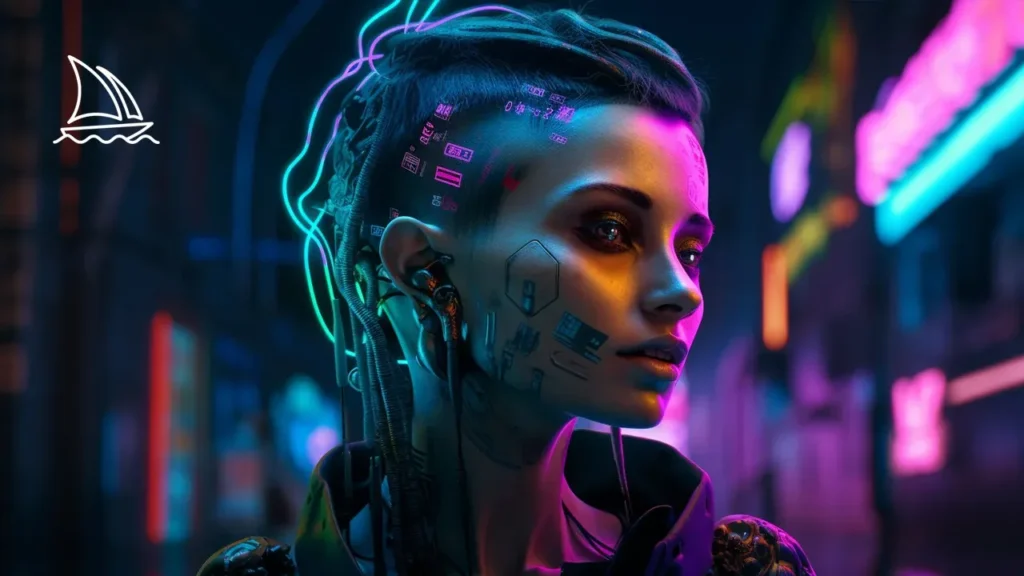
One of Midjourney’s defining strengths is its artistic quality. While many AI image generators focus primarily on realism, Midjourney is well known for producing images with cinematic lighting, rich textures, dramatic compositions, and creative interpretations. This makes it a popular choice for artists, creative agencies, authors, architects, advertisers, and game developers.
Today, Midjourney has become one of the leading AI art platforms, helping millions of users create everything from social media graphics and concept art to branding assets and product illustrations.
How Does Midjourney AI Work?
Midjourney uses advanced generative AI models to convert written descriptions into original images. Rather than searching existing pictures online, it creates entirely new artwork by interpreting the words and visual concepts included in a prompt.
The AI analyzes each prompt, understands the relationship between objects, environments, lighting, styles, and colors, and then generates several image options that closely match the user’s description.
Understanding Text-to-Image Generation
Text-to-image generation begins when a user enters a prompt describing the image they want to create. The prompt can include details such as:
- Subject or object
- Background or environment
- Art style
- Lighting conditions
- Camera angle
- Color palette
- Mood or atmosphere
- Image quality
- Aspect ratio
For example, a prompt like:
“A futuristic cyberpunk city at sunset with neon lights, flying cars, cinematic lighting, ultra-detailed, 8K.”
provides the AI with enough context to generate rich, visually appealing artwork.
The more descriptive your prompt is, the better Midjourney can understand your creative vision and produce accurate results.
How Prompts Influence Results
Prompt engineering is one of the most important aspects of creating high-quality AI artwork. Every word, adjective, and artistic reference influences the final output.
A simple prompt such as:
“A castle”
may produce a generic medieval structure.
However, a more detailed prompt like:
“An ancient stone castle on a snowy mountain at sunrise, cinematic lighting, fantasy art, ultra-realistic, volumetric fog, highly detailed, 8K.”
gives Midjourney much more context, resulting in a richer and more visually impressive image.
Users can further refine results by specifying:
- Artistic movements
- Photography styles
- Camera lenses
- Rendering engines
- Stylization levels
- Aspect ratios
- Image quality settings
Mastering prompt writing significantly improves image consistency and overall quality.
Why Midjourney Produces High-Quality Images
Several factors contribute to Midjourney’s reputation as one of the best AI image generators available today.
First, the platform places a strong emphasis on artistic composition. Its images often feature balanced layouts, dramatic lighting, realistic textures, and visually engaging perspectives.
Second, continuous improvements to its AI models have enhanced image sharpness, facial accuracy, anatomy, environmental realism, and fine details.
Finally, Midjourney offers powerful refinement tools, including image variations, upscaling, and prompt customization. These features enable users to iterate on ideas quickly and achieve polished, professional-quality results with minimal effort.
Key Features of Midjourney AI Picture Generator
Midjourney offers a comprehensive set of features that support everything from quick concept sketches to production-ready digital artwork. Its combination of AI-powered creativity and user control makes it one of the most versatile image generation platforms available.
High-Resolution Image Creation
Midjourney is capable of generating high-resolution artwork with exceptional detail and clarity. Whether you’re creating product concepts, architectural visualizations, fantasy illustrations, or marketing assets, the platform produces images with impressive textures, lighting, and depth.
Its built-in upscaling functionality enhances image quality even further, making the final output suitable for websites, presentations, advertising campaigns, print materials, and professional portfolios.
Artistic Styles and Customization
One of Midjourney’s biggest strengths is its ability to generate artwork in a wide range of visual styles. Instead of limiting users to a single artistic approach, the AI can adapt its output based on the prompt.
Popular styles include:
- Photorealistic
- Digital painting
- Oil painting
- Watercolor
- Anime
- Fantasy art
- Cyberpunk
- Steampunk
- Pixel art
- Comic book illustrations
- 3D renders
- Minimalist illustrations
This flexibility allows creators to experiment with different visual identities without switching between multiple design tools.
Fast Image Generation
Creating high-quality artwork manually can take hours or even days. Midjourney dramatically reduces this time by generating multiple image variations within minutes.
Rather than starting from a blank canvas, users receive several creative interpretations of their prompt almost instantly. This accelerates brainstorming, concept development, and content production, making Midjourney especially valuable for agencies, marketers, and creative teams working under tight deadlines.
Prompt-Based Creativity
Unlike template-based design platforms, Midjourney gives users complete creative freedom through natural language prompts. A well-written prompt can combine subjects, moods, artistic styles, lighting, textures, and colors to produce highly personalized visuals.
This prompt-driven workflow encourages experimentation and enables users to create unique artwork that would be difficult or time-consuming to produce manually.
Upscaling and Variations
Once an initial set of images has been generated, Midjourney provides powerful refinement options.
The Upscale feature increases image resolution while preserving fine details, making artwork suitable for professional applications.
The Variation feature creates new versions of a selected image while maintaining its overall composition and style. This allows users to explore different creative directions without starting from scratch, making the design process more efficient and flexible.
How to Use Midjourney AI Picture Generator
Getting started with Midjourney is straightforward, even if you’re new to AI image generation. The platform is designed to make creating professional-quality artwork accessible to everyone, regardless of their design experience.
In the next section, we’ll walk through the complete step-by-step process of creating your first AI-generated image, writing effective prompts, and refining your results for the best possible output.
How to Use Midjourney AI Picture Generator
Creating AI-generated artwork with Midjourney is a simple process once you understand its workflow. While the platform has evolved over time, the basic steps remain the same: sign up, access Midjourney, write a prompt, generate images, and refine the results.
Step 1: Create a Midjourney Account
Visit the official Midjourney website and create an account. If you’re new to the platform, follow the on-screen instructions to complete registration and choose a subscription plan that fits your needs.
Step 2: Access Midjourney
Depending on the latest version of the platform, you can access Midjourney through its web interface or supported community workspace. Log in using your registered account before starting your first project.
Step 3: Write Your First Prompt
Enter a descriptive prompt explaining the image you want to generate. The more specific your prompt is, the better the AI can interpret your idea.
For example:
A futuristic city skyline at sunset with neon lights, flying vehicles, cinematic lighting, ultra-realistic, highly detailed, 8K.
A detailed prompt helps the AI understand your desired subject, atmosphere, colors, lighting, and artistic style.
Step 4: Generate Your Images
After submitting the prompt, Midjourney processes your request and produces multiple image variations. Review each version and decide which one best matches your vision.
Step 5: Refine the Results
Instead of accepting the first image, refine it by:
- Creating variations
- Upscaling your favorite result
- Adjusting your prompt
- Adding more descriptive keywords
- Changing the artistic style
- Experimenting with different aspect ratios
Most experienced users generate several versions before selecting their final artwork.
Best Prompt Writing Tips
Writing better prompts is one of the easiest ways to improve image quality. Even small changes can dramatically affect the final result.
Describe the Subject Clearly
Always start with the main subject.
Instead of writing:
“A dog”
Try:
“A golden retriever sitting beside a mountain lake during sunrise.”
Specific descriptions reduce ambiguity and improve image accuracy.
Add Artistic Style
Tell Midjourney how the image should look.
Examples include:
- Photorealistic
- Oil painting
- Watercolor
- Anime
- Fantasy illustration
- Cyberpunk
- Pixar-style
- Digital painting
- Minimalist illustration
- Concept art
Adding a style helps shape the overall aesthetic.
Include Lighting
Lighting has a major impact on mood.
Useful lighting terms include:
- Golden hour
- Cinematic lighting
- Soft lighting
- Studio lighting
- Neon lighting
- Volumetric lighting
- Dramatic shadows
- Sunset lighting
Mention Camera Details
If you want realistic photography, include camera-related terms such as:
- Wide-angle lens
- DSLR photography
- Macro photography
- Portrait lens
- Shallow depth of field
- Bokeh background
These details make AI-generated images appear more like professional photographs.
Experiment with Parameters
Midjourney supports various parameters that influence image composition, aspect ratio, stylization, and quality. Testing different settings can help you discover unique visual styles and produce more refined results.
Types of Images You Can Create
One of Midjourney’s greatest strengths is its versatility. It can generate artwork for countless creative and professional applications.
Digital Art
Artists use Midjourney to create:
- Character designs
- Fantasy artwork
- Concept illustrations
- Storybook art
- Abstract designs
Marketing Graphics
Businesses generate:
- Social media posts
- Blog illustrations
- Advertising visuals
- Promotional banners
- Website hero images
Product Mockups
Entrepreneurs use AI-generated images for:
- Product concepts
- Packaging ideas
- Brand presentations
- E-commerce visuals
Book Covers
Authors and publishers create:
- Novel covers
- Children’s book illustrations
- Comic artwork
- Educational graphics
Game Development
Game designers use Midjourney for:
- Character concepts
- Environment designs
- Weapons
- Creatures
- User interface inspiration
Interior and Architecture Concepts
Architects visualize:
- Interior spaces
- Building concepts
- Furniture layouts
- Landscape designs
Midjourney Pricing Plans
Midjourney offers multiple subscription plans designed for individuals, professionals, and businesses. Pricing and included features may change over time, but plans generally differ in:
- Monthly image generation limits
- Fast GPU time
- Relaxed generation mode
- Stealth or private generation options (on eligible plans)
- Commercial usage rights
- Concurrent job limits
Before subscribing, compare the available plans based on your expected workload. Casual users may only need a basic plan, while agencies and professional creators often benefit from higher-tier subscriptions.
Midjourney vs Other AI Image Generators
| Feature | Midjourney | DALL·E | Adobe Firefly | Stable Diffusion |
| Image Quality | Excellent | Excellent | Very Good | Very Good |
| Artistic Style | Outstanding | Strong | Strong | Flexible |
| Photorealism | Excellent | Excellent | Very Good | Good |
| Ease of Use | Easy | Easy | Easy | Moderate |
| Customization | High | High | Medium | Very High |
| Commercial Use | Yes (subject to plan and terms) | Yes | Yes | Depends on deployment |
| Best For | Artists & creators | General users | Adobe ecosystem | Developers & advanced users |
Each platform has strengths, but Midjourney remains a leading choice for users seeking visually striking, artistic image generation.
Pros and Cons
Pros
- Exceptional image quality
- Beautiful artistic style
- Fast image generation
- Easy to learn
- Frequent model improvements
- Excellent prompt interpretation
- Ideal for professional creative work
Cons
- Subscription required for ongoing use
- Results depend heavily on prompt quality
- AI may occasionally misinterpret complex instructions
- Fine text within images can still be inconsistent
- Learning advanced prompting takes practice
Real-World Use Cases
Midjourney is used across numerous industries.
Graphic Design
Designers quickly create concepts before moving to traditional editing software.
Content Marketing
Marketing teams produce custom visuals for blogs, newsletters, and social media campaigns.
Advertising
Agencies generate campaign concepts, storyboards, and promotional graphics.
Education
Teachers create illustrations, educational diagrams, and presentation visuals to support learning.
Publishing
Authors use Midjourney to design book covers, chapter illustrations, and promotional artwork.
Entertainment
Studios and independent creators develop concept art, characters, and environments for games, films, and animations.
Common Mistakes to Avoid
Many beginners make avoidable mistakes that reduce image quality.
Some of the most common include:
- Using overly short prompts
- Forgetting to specify an artistic style
- Ignoring lighting and composition
- Expecting perfect results on the first attempt
- Not experimenting with variations
- Skipping prompt refinement
- Using conflicting descriptions within the same prompt
Improving your prompts gradually often produces better results than rewriting them entirely.
Best Practices
To consistently create better AI-generated images:
- Be descriptive and specific.
- Mention the artistic style.
- Include lighting details.
- Define the environment.
- Specify colors and mood.
- Experiment with different prompt structures.
- Generate multiple variations before making a final choice.
- Save successful prompts for future projects.
- Keep learning from community prompt examples and official documentation.
Conclusion
The Midjourney AI Picture Generator has become one of the most powerful AI image creation platforms available today. Its ability to transform simple text prompts into visually stunning artwork makes it an invaluable tool for designers, marketers, businesses, educators, authors, and creative professionals.
Whether you’re creating concept art, advertising graphics, social media visuals, product mockups, or imaginative digital illustrations, Midjourney offers the flexibility and quality needed to bring ideas to life quickly. By learning how to write effective prompts, experimenting with styles, and refining generated images through variations and upscaling, you can unlock the platform’s full creative potential.
As AI-powered design continues to evolve, Midjourney remains at the forefront of visual content generation, making it a compelling choice for anyone looking to streamline creative workflows while producing high-quality, original artwork.
Frequently Asked Questions
Is Midjourney AI free?
Midjourney typically requires a paid subscription for continued access. Check the official pricing page for the latest plans and features.
Can beginners use Midjourney?
Yes. Beginners can create impressive images by starting with simple prompts and gradually learning more advanced prompt-writing techniques.
Is Midjourney good for commercial projects?
Many subscription plans allow commercial use, but always review the latest licensing terms before using generated images in business projects.
What types of images can Midjourney create?
It can generate concept art, illustrations, realistic photos, fantasy scenes, anime artwork, product mockups, marketing graphics, architectural concepts, and much more.
Does prompt quality matter?
Absolutely. Clear, descriptive prompts generally produce more accurate and visually appealing results.